

Save Big on 4 Premium Themes - Kalles, Ecomus, Unsen, Gecko - 30% OFF! View all discounted items  

Header background

Heading page

Lucy

Written by Lucy

Last updated

20 views

On this page


The Heading Page is the top section of each collection, designed to help users immediately recognize the content of the collection and navigate the website easily.

You can see the collection’s featured image, its title, and the breadcrumb navigation.
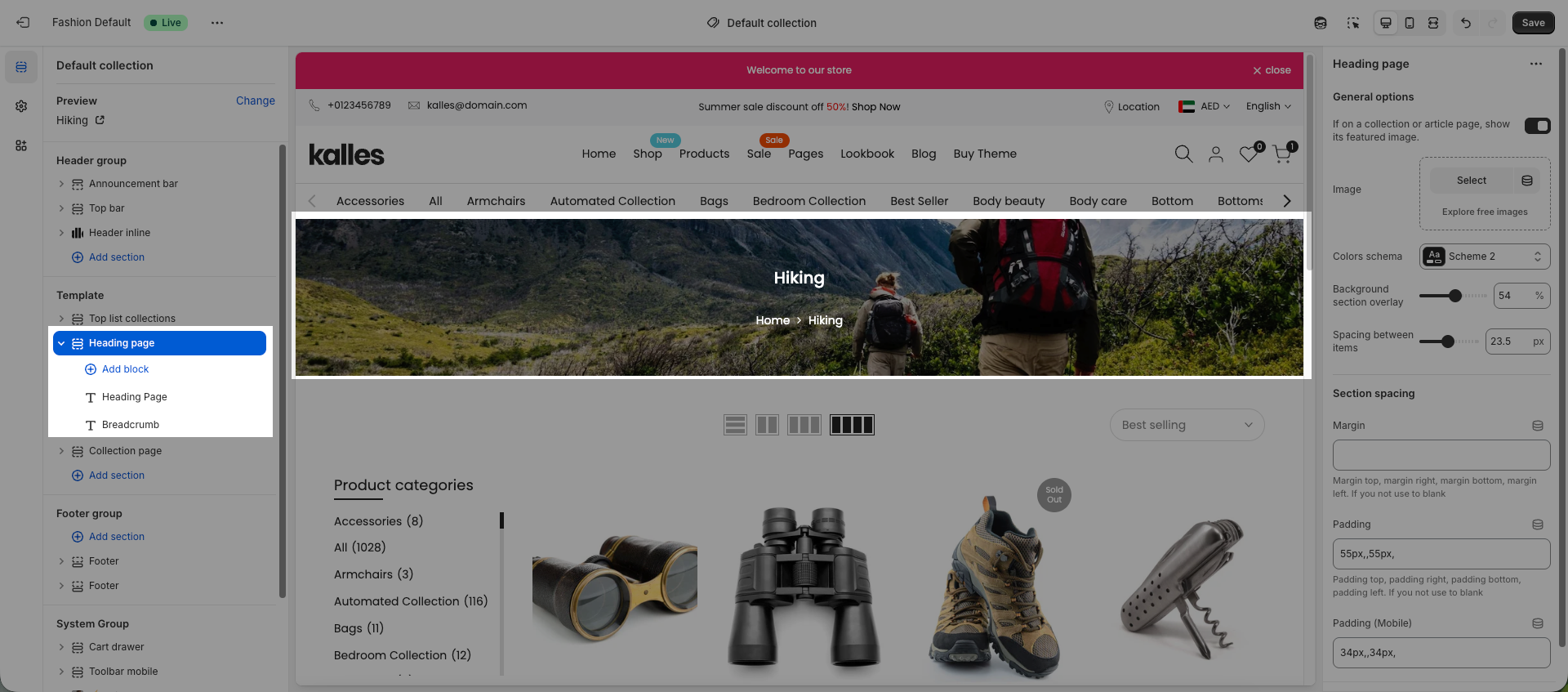
headingpagecollection.png

1. General setting

You can use the collection image that has already been uploaded to Shopify, or upload a new image yourself. In addition, you can adjust the overlay and the spacing between the title and the breadcrumb.

Please check video below to see.

2. Show full collection image

If you want to show full collection image, you can use hero image section:

🎁 Exclusive Deals for The4 Customers

EComposer

🎉 EComposer – Free 6-Month Plan

Build landing pages, sales funnels, and more with drag & drop.
The4 users get 6 months free (save $114) on Standard plan.

  • ✅ 300+ templates ready to use
  • ✅ Build any Shopify page
  • ✅ No coding required
🔓 Get 6 Months Free
SectionAI

🤖 EcomRise: Upsell & Bundles

Boost sales effortlessly with product bundles, upsell and cross-sell, buy X get Y, volume discounts

  • ✅ Easy upsell & cross-sell
  • ✅ Works with the latest themes
  • ✅ Trusted by 10k customers
🚀 Get 6 Months Free

Enjoy a free 3-day trial. Then get your first month for $1. Try Now

We uses cookies to ensure you get the best experience on our website.
